
Introduction
Learn how to embed your return portal directly into your Shopify store page for a seamless customer experience.
Access this feature
Navigate to /customization/returnPreview in your application.
Step 1: Access Your Shopify Admin Dashboard
Access Shopify Admin
Begin by accessing your Shopify admin panel.
- 1Log in to your Shopify account
- 2Navigate to the Admin Dashboard
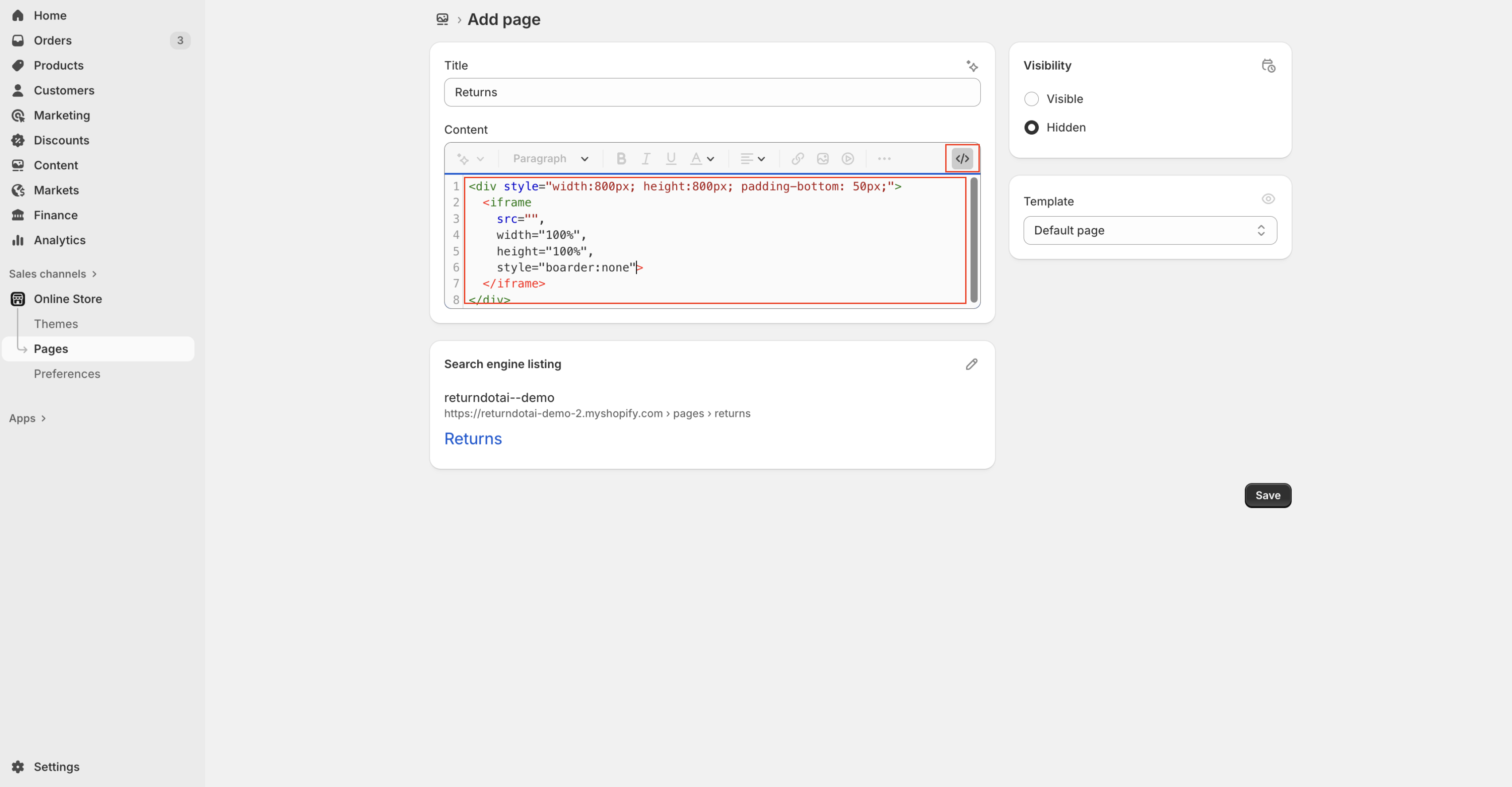
Step 2: Create a New Page
Create a New Page
In the Shopify Admin Dashboard, create a new page for your return portal.
- 1In the Shopify Admin Dashboard, go to Online Store in the left-hand menu
- 2Click on Pages
- 3Click on Add Page
Step 3: Configure the New Page
Configure the New Page
Set up the page title and switch to HTML editor.
- 1In the Title field, enter a suitable title for your return page, such as "Returns" or "Return & Exchange"
- 2In the Content section, switch to the HTML editor by clicking on the <> icon
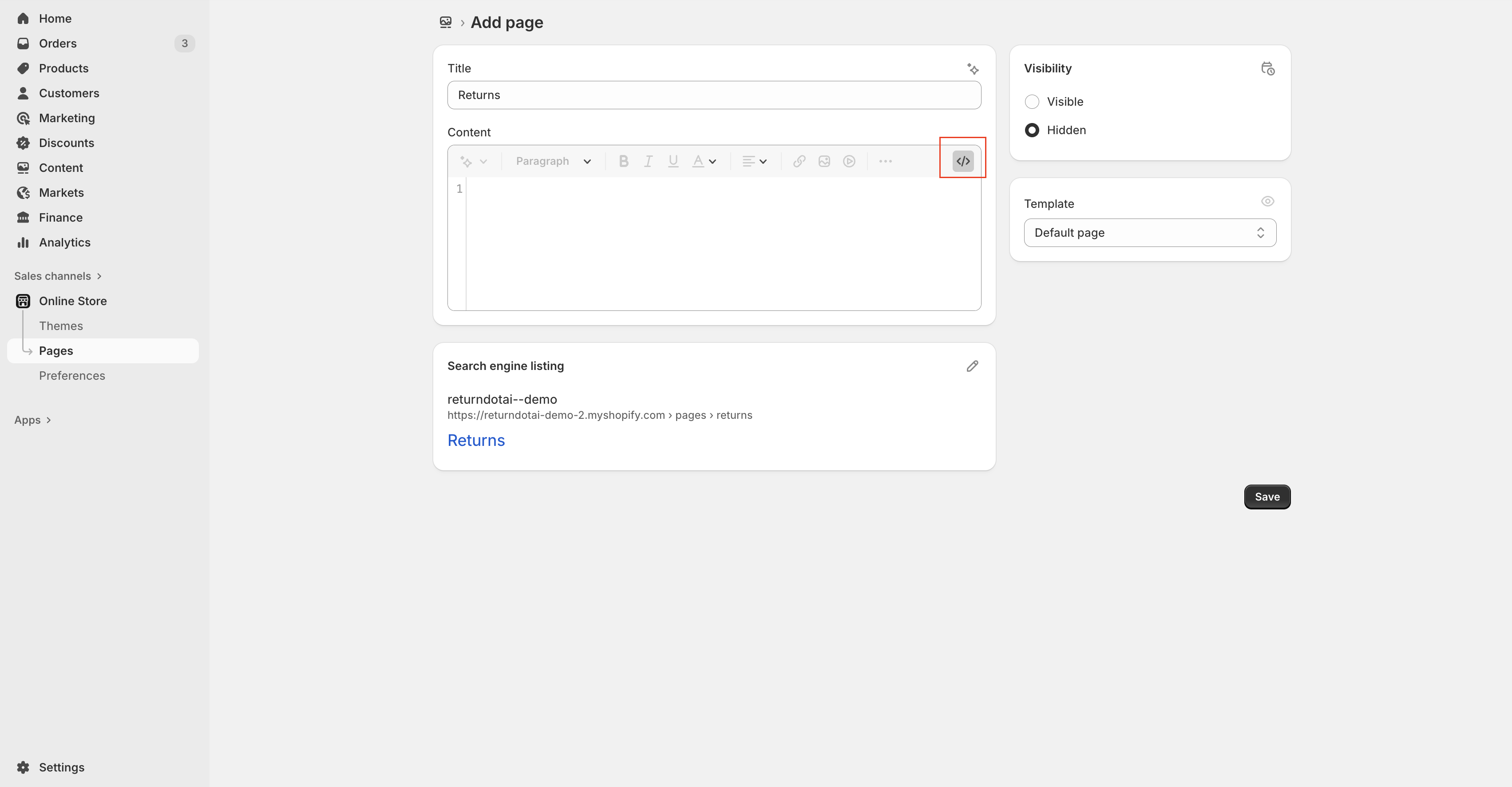
Switch to HTML Editor
Switch to the HTML editor to paste the embed code.
- 1In the Content section, switch to the HTML editor by clicking on the <> icon
Step 4: Embed the Return Page Code
Obtain the Embed Code
Obtain the embed code for your Returndotai Returns page from your Returndotai Returns dashboard.
- 1Log in to your Returndotai Returns account
- 2Navigate to the Return Page settings
- 3Copy the provided embed code
Paste the Embed Code
Paste the copied embed code into the HTML editor of the new page on Shopify.
- 1Paste the copied embed code into the HTML editor of the new page on Shopify
Step 5: Save and Publish the Page
Save and Publish
Save your changes and view the new page.
- 1Click Save to create the new page
- 2You can view the new page by clicking on the View Page button after saving
What's differences between embedding and adding link of return page?
Comparison Table
Understanding the key differences between embedding and adding a link.
| Aspect | Embedding | Adding a Link |
|---|---|---|
| Display | Content appears directly on your store's page | Users are redirected to an external page |
| User Experience | Seamless integration within your store | Users leave your store to access the external content |
| Implementation | Requires embedding HTML code into your Shopify page | Requires adding a hyperlink URL in the navigation menu |
| Example | An embedded returns form on your Shopify page | A navigation link to a return portal hosted on another domain |
Key Features
Seamless Integration
Embed the return portal directly into your Shopify store pages
Easy Setup
Simple 5-step process to create and publish your embedded returns page
Brand Consistency
Maintain your store's branding throughout the return process
Important Notes
Use HTML Editor
Always paste the embed code in HTML editor mode (click the <> icon), not the visual editor.
Test After Publishing
View your page after saving to ensure the return portal displays correctly.
Related Articles
Comment Block in Timeline
Add comments, notes, and documentation directly to return request timelines
How to Customize Return Page URL by Shopify App Proxy
Set up custom URLs for your return portal using Shopify app proxy integration
Auto-sync with brand color
Automatically synchronize your store theme colors with the return portal
Support A Record (White-label domain)
Configure custom domains for your return portal using A record DNS settings